Visitors Maps: Geographically visualize & locate website visitors from all over the globe

Locating your visitors on the globeIn the world of widgets(that are specific in action & use), a class of widgets providing a tool for monitoring the traffic & visits on websites & blogs from all over the globe. Knowing the geographic location & hits of visitors from a specific part of the world can be very useful to analyze the performance of the website in terms of volumes of hits from a specific part of the world & where the content targeted the most. Here is the list of the best visitor capturing maps for websites & blogs which are the best location identification tool.

The Number One: ClustrMaps
 
The most popular, free, easy to generate & at a glance visualization tool are ClustrMaps. ClustrMaps is a real time combined hit counter and geographic visualization tool. Once website URL & Email is provided to ClustrMaps, a HTML code thus generated, needs to be copied into a web page or 'blog gutter'. This HTML code includes a link to a thumbnail geographical map image of the world which shows the location of the visitors arrived.

How it works? When that image loads, it increments a counter on the ClustrMaps site and, when the map is updated (daily, weekly, or monthly, depending on website and blog traffic) it shows the locations of all the visitors to webpage since the beginning of a specific time interval. Clicking on that thumbnail map image reveals a larger world map display.

The Number Two: VisitorMaps
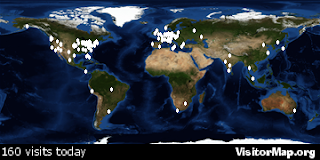
 
Cluster Map of Intelligent MovesAnother blog visitor's location monitoring tool is from VisitorMap.org which is also a free service. It is different from ClustrMaps as it shows the location of all the visitors to your site in the last 24 hours. It also provides a facility to users to customize the map  style, map size, visitor marker & color for the visitor markers.

Why Visitor Maps? 
Visitor Maps are quite helpful to:
  • Know your visitors: Knowing who are your websites and blog readers.

  • Target your content: Helps targeting your website and blog content ,adjust your content, your pitch, or your advertising according to the specific set of visitors.

  • Show off your community: Developing a reader's community based on continents.

  • Automatic: clicks optional: Each visitors to your site is automatically counted properly. Just visiting your site is sufficient. Of course, visitors can optionally click on the little thumbnail map widget and be taken to a large world map view for additional detail.

  • Speedy, scalable: Knowing the numbers of visits from a specific part of the world.

More Useful Posts: 


Read MoreContinue Reading Intelligent Moves


Digg ThisAdd To Del.icio.us Add To Furl Add To Reddit Fav This With Technorati Add To Yahoo MyWeb Add To Newsvine Add To Google Bookmarks Add To Bloglines Add To Ask Add To Windows Live Add To Slashdot Stumble This

Experience the Digg Effect: Adding the "digg it" button to each blogger(blogspot) blog posts

Digg Logo
Today, Digg is a most eminent place for we people to get linked with the notions, contents & information from anywhere on the web. Digg, the biggest online destinations is powered by the richness of great stuffs, information & contents from multiple sources(experts, bloggers, websites, news etc). Digg button can provide a real source of traffic to blogs & websites (increased number of readers) and for that adding the "digg-it" button to each blogger post is necessary to experience the Digg Effect.

First go for the following checks:
Digg LogoCheck 1: To start with first Register to http://digg.com/  to have an digg account & enter the digg world.( If already registered, skip this check)
Check 2: Make sure your blog is set to Enable Post Page.Click here to see how to enable post pages.

Now proceed with the following steps: 
1. Log in to your blogger account & click on the Layout tab of the blog which you want to add the digg button.
2. Navigate through Template –> Edit HTML and backup your blog template by clicking on Download Full Template. This backup will help you if in case the changes met are not fruitful & for uploading previous template to blogger.com.
    3. Click on and search for <p><data:post.body/></p> (Press Ctrl + F to search)and paste the  next code just before <p><data:post.body/></p>:
    <div style='float:right; margin-left:10px;'>
    <script type='text/javascript'>digg_url = '<data:post.url/>';</script>
    <script src='http://digg.com/tools/diggthis.js' type='text/javascript'/>
    </div>
    4. Click on Preview to ensure that the Digg button appears at the top right of all your posts. If is located properly, click on the Save to save your blog tepmalte & view your blog.

    Possible Modifications:
    You can change  float:right; by float:left; in <div style='float:right; margin-left:10px;'> line in the third step, make the digg button appear on the top left of all blog posts. 
    Now you are ready to experience the digg effect. Enjoy Digging. 

    If you like this post then please consider commenting & subscribing to Intelligent Moves RSS Feed.
    You can also
    suscribe by email have articles sent directly to your inbox.

    More Useful Posts: 
    ● Uploading A New Template In Blogger.com
    ● Adding Expandability to each Blogger Posts using "Read More..."
    ● Why Widgets? Widgets are the Back-bone for Websites & Blogging Platforms
    ● Get into the Search Results on web: Search Engine Optimization is what web-developers & bloggers need
    ● Increase Blog Traffic: Submit your websites & blogs to 100+ search engines & directories for Free


    Read MoreContinue Reading Intelligent Moves


    Digg ThisAdd To Del.icio.us Add To Furl Add To Reddit Fav This With Technorati Add To Yahoo MyWeb Add To Newsvine Add To Google Bookmarks Add To Bloglines Add To Ask Add To Windows Live Add To Slashdot Stumble This

    Increase Blog Traffic: Submit your websites & blogs to 100+ search engines & directories for Free

    Search engine results makes all the differenceThe Primary Step in Search Engine Optimization(SEO) is submitting(or more specifically registering) your websites and blogs to the search engines which are the real source of traffic on any websit and blog. To increase search engine friendliness & traffic to your websites, you need to add your website/blog URL to different search engines & website directories so that your blog URLs get indexed in search engine's databases.
    Here you can can submit your website to about 100+ search engines & directories.

    Search engine results makes all the difference.

                                      
    1. Manually Submitting your website to Google.com
    Google is still the leader in the search engine market in Internet.
    Google has 59.3% of total search share in U.S. for the month of May 2008. There is 3% increase in the search engine market share for Google when compared to the same period in 2007. But the share is decreased by 2.7% when compared to April 2008, where it has 62% of the market share, which is the highest ever gained by a search engine. The number of search queries increased by 15.4% over the year. Click here to submit your site to Google.com
    2. Manually Submitting your website to Yahoo.com
    Next to Google is Yahoo. Click here to submit your site to Yahoo.com
    3. Manually Submitting your website Windows Live
    Microsoft’s Windows live search is at third position with 13.3% share of total US search market for the month of May, 2008, which is the highest share for MSN in the last five months. The market share grew by 4.9% from May, 2007 and 3.6% over the month of April 2008. Windows also registered 72.4% growth in the number of searches compared to previous year. Click here to submit your site to Yahoo.com
    Why submit your site manually to each search engine, when you can submit your URL from one place to all of them just by filling out one simple form that only asks for your web site URL and email address.
    4. Submitting your website to Submit Express
    Click here to submit your site to 40+ search engines and directories for free
    by filling up just one form.(submits through one form to all sites in one go)
    5. Submitting your website to searchengineoptimising.com(SEO)
    To add your URL below to submit to 100 search engines like altavista, excite, go, google, hotbot, infoseek and lycos & more click here.
    6. Submitting your website to scrubtheweb.com
    To add your URL below to submit to 10 more search engines, click here.
    Repeatedly submitting(twice in a month) your website URL to different major search engines can help in greater page ranks, more visibility in search engine results & thus help in a traffic boost at website & blog.


    If you like this post then please consider commenting & subscribing to Intelligent Moves RSS Feed.
    You can also
    suscribe by email have articles sent directly to your inbox.


    ●  Why Widgets? Widgets are the Back-bone for Websites & Blogging Platforms

    Read MoreContinue Reading Intelligent Moves


    Digg ThisAdd To Del.icio.us Add To Furl Add To Reddit Fav This With Technorati Add To Yahoo MyWeb Add To Newsvine Add To Google Bookmarks Add To Bloglines Add To Ask Add To Windows Live Add To Slashdot Stumble This

    Get into the Search Results on web: Search Engine Optimization(SEO) is what web-developers & bloggers need

    Web is growingThe web is growing & expanding at an unbelievable pace which can be easily figured out with these facts:
    ● With about 186,727,854 total number of web sites(including blogs) in the month December 2008 survey by netcraft(which is grown by 1.56 million sites since November 2008),
    ● About 100 million + bloggers on the web &
    ● About 3,105 total number of search engines operating in 6 worldwide regions in 211 different countries(as on January 2003), the essense of Search Engine optimization really comes into play.

    The Major search engines on the Web.
    The Major search engines on the Web.
    Thus, it becomes even more challenging to be catched in the search engine results to get more traffic on the websites & blogs.
    SEO Search Engine Optimization

    What is Search Engine optimization(SEO)? I think that SEO are those techniques which helps websites & blogs to be more friendly to search engines. It helps building potential improvement in the site performance on internet & involves increasing the ability of wesites & blogs to maintain high exposure and visibility under major search engines & search tools.
    SEO  are themselves  "brain-spinning" techniques & cover a vast arena of concepts & implementations. Here are the differnent tools under SEO to improve your website's & blog's page rankings:

    ● Website Content & Structure
    ● Quality & Quantitiy of contents of websites & blogs
    ● Link building
    ● Keywords
    ● Socialization of websites & blogs(using Widgets)
    ● Website friendliness for search engines
    ● Comments & Link exchanges.

    I will focus on all these aspests individually in my next posts.

    ●  Why Widgets? Widgets are the Back-bone for Websites & Blogging Platforms


    Read MoreContinue Reading Intelligent Moves


    Digg ThisAdd To Del.icio.us Add To Furl Add To Reddit Fav This With Technorati Add To Yahoo MyWeb Add To Newsvine Add To Google Bookmarks Add To Bloglines Add To Ask Add To Windows Live Add To Slashdot Stumble This

    Why Widgets? Widgets are the Back-bone for Websites & Blogging Platforms

    Today widgets are indispensable tools for websites, more specifically the entire blogs derive their power from the widgets & these "magic-codes" acts as a vehicle to link the blogging world. 
    What are widgets? Widgets are highly optimized, small but powerful pieces of code (programs), with the property to be embedded into blog’s template & webpages to give some added functionality on the respective webpage. Widget codes are easily adaptable to changes made by the user.
    Why widgets? Which widgets to use? The most important question for bloggers is answered here.


    Widgets are the web-tools providing:
    • Linkage to your websites & blogs to the different social networking sites, workgroups, communities & forums of the people belonging to different parts of the World.
    • Blog & website analysis & tracking in terms of performance & traffic (visitors).
    • Improvement of blog & website accessibility, intetractivity & traffic (of course).
    • Socializing & bookmarking (Saving your Favorite posts, articles & webpages).
    • Customization & beautification of your websites & blogs.
    • Direction on becoming more reader specific & targeted (Getting the actual taste/choice of Readers).

      Today about 1000s of widgets are available & are specific in action & use. I categorize widgets into 2 major classes:
      1. Widgets for websites & blogs.
      2. Widgets for Socializing websites & blogs.(Widgets for Traffic)
      I will present the list of the most popular & successful widgets for blogs in my next posts.
      ©Techprism: Riddhi Mohan
       

    Read MoreContinue Reading Intelligent Moves


    Digg ThisAdd To Del.icio.us Add To Furl Add To Reddit Fav This With Technorati Add To Yahoo MyWeb Add To Newsvine Add To Google Bookmarks Add To Bloglines Add To Ask Add To Windows Live Add To Slashdot Stumble This

    Adding Expandability to each Blogger Posts using "Read More..."

    We often find web pages with a very small scroll bars at the right ,that is, those having all the full expanded posts putting entire individual post's contents on the homepage. It not only takes time to transfer/load the page but also increases the page space complexity. In this case, Adding an expandability to each blogger posts using the link "Read More..." will allow readers to see all the posts in a more organized & compacted way & help them to switch to full posts option.


    It will also help in loading the pages more quickly. Here is the full working & tested way to add "Read More" to each blogger posts.Now Proceed as follows:


    1. Login to your blogger account.
    2. Enabling Post Pages: Go to Settings > Archiving, then select Yes > Save the Settings. 
    3. Pre-formatting Post Editor: Go to Setting > Formatting, then scroll down to bottom, paste the following code in the Post Template & Save Settings.

    <span class="fullpost">
    </span>


    4. Now go to Layout > Edit HTML, click on Expand Widget Template & search for the following code:

    <data:post.body/>

    5. Copy the code below & paste it ABOVE/BEFORE the previous line in blogger template.


    <b:if cond='data:blog.pageType == "item"'>
    <style>.fullpost{display:inline;}</style>
    <p><data:post.body/></p>
    <b:else/>
    <style>.fullpost{display:none;}</style>


    6. Copy the code below & paste it BELOW/AFTER the <data:post.body/> line in the blogger template.

    <b:if cond='data:blog.pageType != "item"'><br />
    <a expr:href='data:post.url'>Read more...</a>
    </b:if>
    </b:if>

    7. Save the Template & Its all done. Now, Go to Posting > Create. You will see

    <span class="fullpost">
    </span> 
    in the post area in the Edit HTML tab.
    Anything you put above the tag <span class="fullpost"> will be the introductory text.PUT main body of your post between the <span class="fullpost"> and </span> tags so that the “Read more…” link expands the main body of the post.
    Enjoy Expandability.

    Read MoreContinue Reading Intelligent Moves


    Digg ThisAdd To Del.icio.us Add To Furl Add To Reddit Fav This With Technorati Add To Yahoo MyWeb Add To Newsvine Add To Google Bookmarks Add To Bloglines Add To Ask Add To Windows Live Add To Slashdot Stumble This

    Newer Posts Older Posts Home
    top